Akademie für Lernpädagogik
Educational Research Center
+2.7K new ads€7.4M
AdSpends for Gemini|MCP server
AdSpends is the Meta ads database Gemini reads through the Model Context Protocol: ads, brands and landing pages with estimated EU ad spend. Gemini finds the data, you decide what to do with it. Looking for Claude, ChatGPT or Cursor? See every setup guide.





AdSpends MCP
Connect AdSpends to Gemini, Claude, ChatGPT, Cursor or Codex. Search Meta ads, inspect brands and break down landing pages, ranked by estimated EU ad spend.
> GEMINI
Using: 1 MCP server (adspends)
> Show me the top Meta ads in Germany this week
✦Here are the top Meta ads in Germany this week, ranked by estimated EU ad spend:
1
384.339€
13M

JYSK Deutschland
Tolle skandinavische Weihnachtsangebote – Mach dich bereit für unsere Weihnachtsangebote und bringe festliche Stimmung in dein Zuhause

Spare bis zu 60%
2
27.059€
902K

Amazon Prime Video
Tauche ein in Dexter: Wiedererwachen, jetzt zum Streamen auf Prime Video mit einem Paramount+ Abo verfügbar.
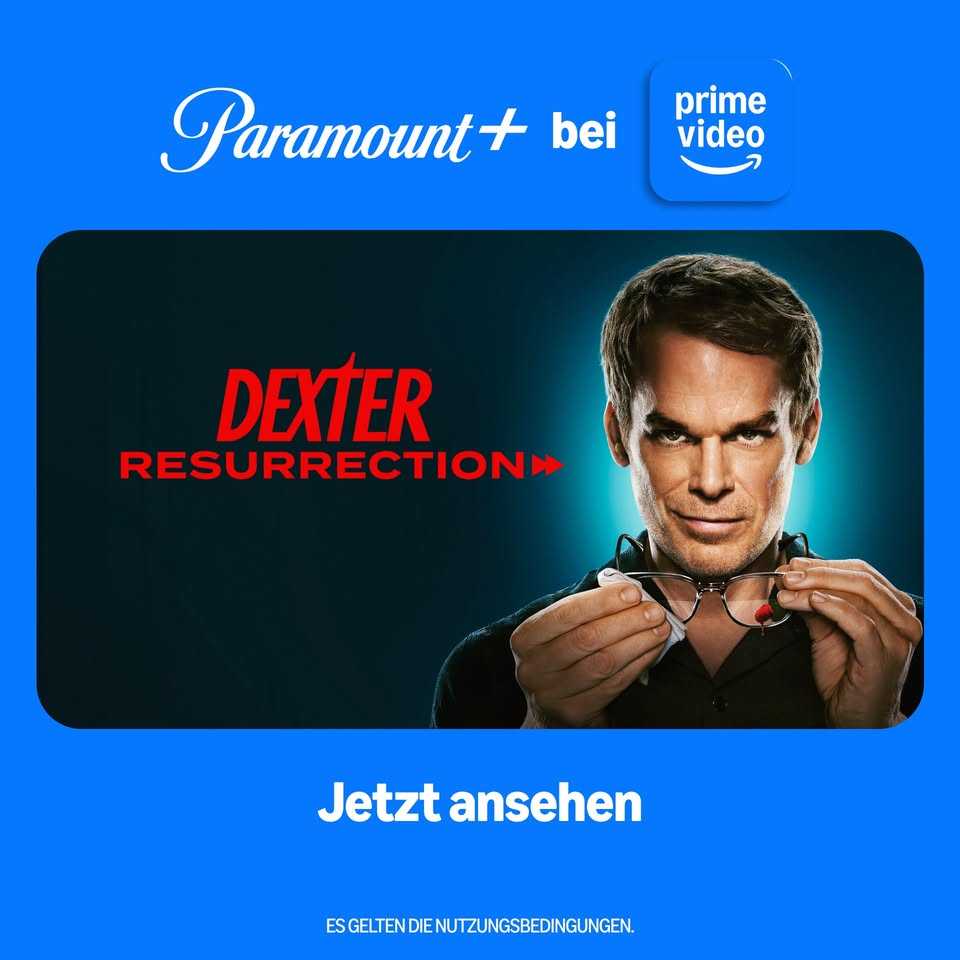
Dexter ist zurück
3
26.286€
876K

Koriderm
Say goodbye to wrinkles with this all-in-one skincare solution 👋

Buy 1 Get 1 Free Today Only!
Type your message or @path/to/file
Create a key, add the server, ask. Create an AdSpends API key, run one command in your terminal, then ask Gemini CLI about ads, brands and landing pages. Setup takes under a minute.
Run this command and replace the placeholder with your API key. It saves AdSpends to ~/.gemini/settings.json, so it works in every folder. You get the full toolset: ads, brands, landing pages and your saved boards.
gemini mcp add --transport http --scope user \
  --header "Authorization: Bearer <YOUR_API_KEY>" \
  adspends https://app.adspends.com/api/mcp
Gemini CLI sends your AdSpends API key as a Bearer header. Create and revoke keys at app.adspends.com/mcp.
Create your API key →Gemini CLI is free to install and works anywhere. Leave out --scope user to save AdSpends only for the current project in .gemini/settings.json.
Using the Gemini web app?
Google lets you add custom apps on gemini.google.com: open Settings → Connected Apps → Add a custom app, paste https://app.adspends.com/api/mcp, click Next and sign in to AdSpends. Google currently limits custom apps to personal Google accounts in the US, aged 18 or over, with the app set to English. Once added, AdSpends also works in the Gemini mobile app.
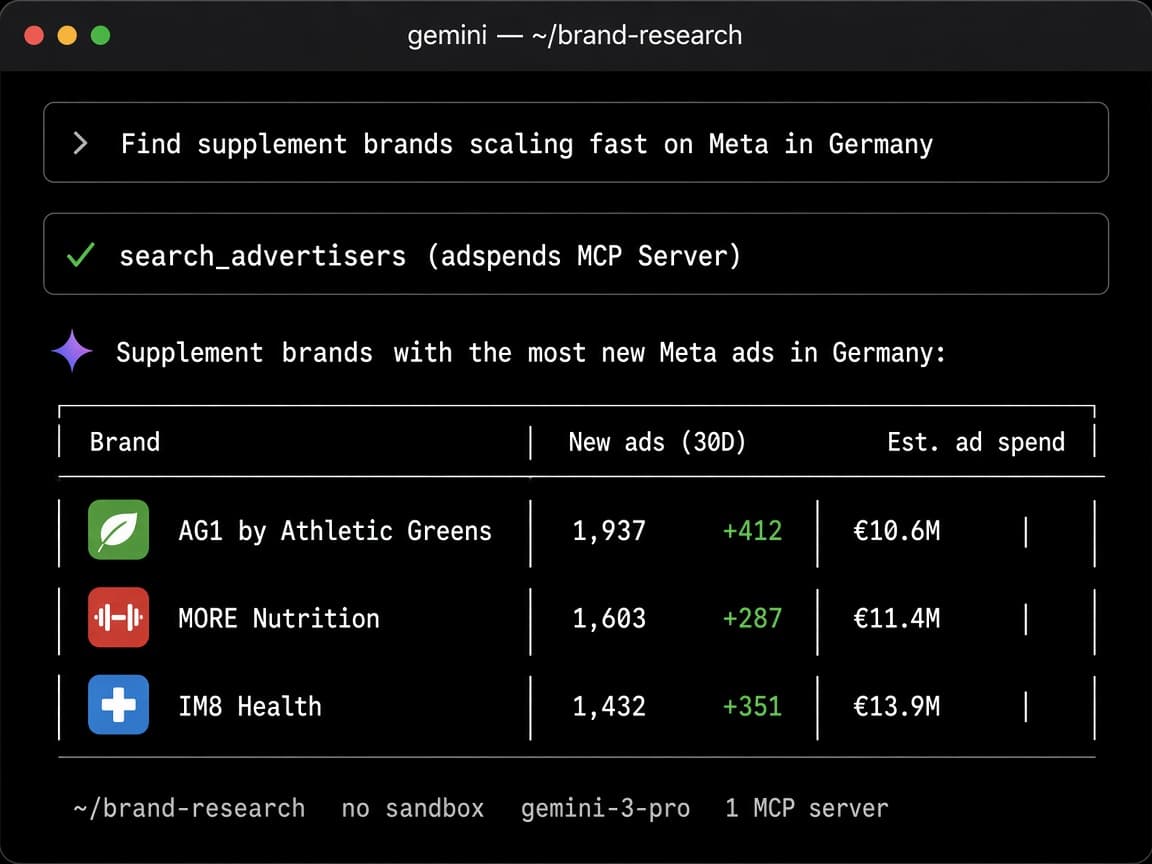
Sign in at app.adspends.com/mcp and create an API key. The free trial works too.
Run the gemini mcp add command with your key. Then start gemini and type /mcp to see AdSpends connected.
Ask in plain English. Gemini picks the AdSpends tools, asks you to confirm the first call and pulls the data.
Data is updated daily, and the free trial includes 100 API credits.
No. Gemini has no access to Meta’s Ad Library, and web search finds articles about ads, not the ads themselves. The Meta Ad Library shows ads one brand at a time, with spend only for political ads. AdSpends gives Gemini the ads, the spend estimates and the landing pages behind them.
| Feature | Gemini alone | Meta Ad Library | Gemini + AdSpends |
|---|---|---|---|
| Meta ads | No access. Web search finds articles about ads | Search by brand or keyword in the browser | Searches 9.2M Meta ads from the chat |
| Ad spend | Guesses | Only for political and social issue ads | Estimated EUR spend for every ad delivered in the EU |
| Find the winners | Not possible | No sorting by spend or reach | Ranks ads, brands and landing pages by spend and reach |
| Landing pages | Only pages you paste in | Link only | Full page text, page type and the ads pointing to it |
| Video ads | Can’t watch them | Watch one by one | Timestamped transcripts Gemini can read and rewrite |
| Competitor overview | Not possible | Scroll through every ad yourself | Spend, new ads, top ads and top pages in one answer |
| Your research | Not available | Not available | Your saved boards and tracked brands |
Gemini can’t see Meta’s Ad Library. Now it can.
Ask what your market is running. Gemini gets back the ad, the brand running it, its estimated EU ad spend and the landing page it sends traffic to.
9.2M
Every Facebook and Instagram ad delivered in the EU, searchable by copy, format, platform and run time.
849k
Every brand advertising in the EU, ranked by estimated spend, reach and new ads.
739k
Advertorials, quizzes and sales pages, sorted by how many new ads point to them.
Not just a link to the Ad Library. Every ad, brand and landing page arrives with the data behind it.
8 data points
Ad copy and CTA
Primary text and the call-to-action button.
Image and video creative
The original creative file, ready to view.
Video transcriptTimestamped
Spoken text with timestamps, language and duration.
Estimated ad spend
EU reach and spend in EUR for each ad.
Run time and status
First seen date and whether it is still running.
Platforms
Facebook, Instagram, Messenger, Audience Network, Threads.
Destination URL
The landing page the ad sends traffic to.
Performance rank
A 0–100 score to compare ads at a glance.
6 data points
Total estimated spend
Spend in EUR and EU reach across all ads.
Total, active and new ads
New ads in the last 30 days show who is scaling.
Top ads and top landing pages
The brand’s winners by EU reach, in one answer.
Market, category and niche
Where the brand sits, to find its competitors.
Social following
Facebook likes, Instagram followers and profiles.
Advertising history
When the brand was first seen running Meta ads.
7 data points
Full page text as MarkdownMarkdown
Headlines, body copy and offer, up to 20,000 characters.
Page typeAI-classified
Advertorial, quiz, VSL, listicle, PDP, offer page, comparison or shop.
Full-page screenshot
See the layout, not just the words.
Ads sending traffic
Total, active and new ads in the last 30 days.
Spend and share of brand spend
How much of the brand’s budget flows here.
Language and tech stack
Page language and the tools the page is built with.
First and last seen
How long the page has been live in ads.
15 things marketers ask Gemini once AdSpends is connected: find the ads making money, look inside competitors’ accounts, break down their funnels and turn it all into briefs. Copy any prompt and paste it into Gemini.
Skip the guessing. Start from ads with real spend behind them.
Every Meta ad in a niche, ranked by estimated EU ad spend, with creative, copy and landing page.
“Show me the 20 highest-spend skincare ads in Germany from the last 30 days.”
New ads that already pull big reach are the ones brands are scaling right now.
“Which supplement ads launched in the last 14 days already have the most reach? Show me the top 10.”
Gemini reads hundreds of ads and sorts them into angles, pain points and offers, weighted by spend.
“List the angles and pain points weight loss brands in France spend the most on, ranked by estimated spend.”
Turn winning ads into the next creative you test.
Not a pile of saved ads, the pattern behind them. See which openings carry the most spend.
“Pull the top 30 sleep supplement video ads and group their opening hooks into 5 patterns, ranked by spend.”
Timestamped transcripts of the top video ads, ready to rework for your product.
“Get the transcripts of the 3 best collagen video ads and write 3 new scripts for my brand with the same structure.”
Headlines, hooks, reference ads and landing pages from real winners, in your brief template.
“Write a creative brief for a magnesium launch: 10 hooks, 5 headlines, 3 reference ads and 2 landing pages.”
As if you had access to their Business Manager.
Estimated spend, active and new ads, top creatives and where the traffic goes, in one answer.
“How much is MORE Nutrition spending on Meta, which ads are scaling and which landing pages get the traffic?”
Brands launching the most new ads are the ones that found something that works.
“Which beauty brands launched the most new Meta ads in the last 30 days?”
New creatives, offers and angles from any brand, newest first, the week they go live.
“What did my 3 biggest competitors launch on Meta this week? Summarize the new angles and offers.”
Stop sending ads to a basic product page.
Advertorials, listicles, quizzes and VSLs, sorted by the spend behind them, with full page text.
“Show me the joint pain advertorials with the most ad spend and outline the structure of the top one.”
See which page types a brand runs, which ads feed them and how its budget splits.
“Break down the funnel of Bears with Benefits: which page types they use and how much spend goes to each.”
Search pages by the words on them, then compare prices, bundles, guarantees and claims.
“Find hair loss landing pages that mention a money-back guarantee and compare their offers in a table.”
Hours of research every week, done in one prompt.
What the brands you track launched last week and which of their ads got the most reach.
“Give me a Monday report: what my tracked brands launched last week and their 5 biggest new ads.”
Gemini reads your saved boards and tells you what your best saved ads have in common.
“Summarize my “Q4 Hooks” board: which saved ads have the most spend and what do they have in common?”
Agencies build a market report for a prospect in minutes: top spenders, best ads, best pages.
“Build a market report for a pet food prospect: top 10 spenders in Germany, their best ads and landing pages.”
The AdSpends MCP is a Model Context Protocol server that gives Gemini read access to the AdSpends Meta ads database. MCP is the standard way AI tools plug into the apps you use, so Gemini can search ads, brands and landing pages without you opening a dashboard.
{
  "mcpServers": {
    "adspends": {
      "httpUrl": "https://app.adspends.com/api/mcp",
      "headers": {
        "Authorization": "Bearer <YOUR_API_KEY>"
      }
    }
  }
}

// Ads: search_ads, get_ad
// Brands: search_advertisers, get_advertiser,
//   get_brand_overview, get_advertiser_ads
// Landing pages: search_landing_pages, get_landing_page
// Your saved data: list_saved_boards, get_saved_board_ads,
//   list_tracked_brands, ...
// Lookups (free): list_markets, list_categories,
// list_niches, get_usageEvery Meta ad delivered in the EU, across every placement Meta reports. Gemini can narrow any question down by market, niche, platform, format and ad language.
Every brand is sorted into a market, so Gemini can compare it with its real competitors.
Every placement Meta reports reach for.
Ask for one format or compare them.
Classified by AI, so Gemini can ask for one type.
Ask in English, and Gemini still searches ads written in any EU language.
One MCP server, one account, the same credits. Pick the tool you already work in.
The Gemini connection has no separate charge. The free trial includes 100 API credits, and every paid plan includes 2,000 to 30,000 credits per month. Searches cost 1 credit per result, detail lookups 1 to 5 credits, and lookups like markets, niches and usage are free.
See plans & pricing →Gemini CLI authenticates with an AdSpends API key that you can revoke at any time at app.adspends.com/mcp. The Gemini web app signs in through OAuth instead, so no password ends up in the chat. The server is read-only, so Gemini can’t change your boards or trigger anything.
Gemini answers without using AdSpends
Type /mcp to check that AdSpends is connected, or start your prompt with “Use AdSpends to…”.
/mcp shows AdSpends as disconnected
Check that the header reads “Bearer ” followed by your key and that your trial or plan is active, then restart gemini.
Gemini says I’m out of credits
Ask Gemini to check your AdSpends usage (free). Credits reset monthly, and credit packs top you up instantly.
I can’t find Connected Apps in the Gemini web app
Google only offers custom apps to personal accounts in the US for now. Gemini CLI works everywhere with the same account.
Create an API key at app.adspends.com/mcp, then run gemini mcp add --transport http --scope user --header "Authorization: Bearer <YOUR_API_KEY>" adspends https://app.adspends.com/api/mcp. Start gemini and type /mcp to check the connection.
Gemini can search 9.2M Meta ads, 849k brands and 739k landing pages, rank them by estimated ad spend, pull brand overviews with top ads and landing pages, and read your saved boards and tracked brands. It turns the results into hook lists, briefs, files and competitor reports.
No. Gemini has no access to the Meta Ad Library, and Google Search finds articles about ads rather than the ads themselves. With the AdSpends MCP server, Gemini searches Facebook and Instagram ads directly, with estimated ad spend, video transcripts and the landing pages each ad sends traffic to.
Where Google offers custom apps, yes. On gemini.google.com, open Settings → Connected Apps → Add a custom app, paste https://app.adspends.com/api/mcp and sign in to AdSpends. Google currently limits custom apps to personal Google accounts in the US, aged 18 or over, with the app in English. Outside the US, use Gemini CLI.
No. Gemini CLI is free to install and sign in to, and AdSpends works the same on every Gemini CLI login. You need an AdSpends account; the free trial is enough to start.
Yes. Gemini CLI runs a single prompt non-interactively with gemini -p "…", so a cron job can write a weekly competitor report to a file. For fully custom automations, the same data is available through the AdSpends REST API.
AdSpends covers Meta ads delivered in the EU, because the reach data comes from Meta’s EU transparency reporting. Coverage is deepest in Germany and the DACH region. Brands are grouped into markets such as Health & Supplements, Beauty & Skincare, Fashion, Home & Garden and Pet Supplies, and ads can be filtered by language, platform and format.
From the Meta Ad Library. AdSpends collects Facebook and Instagram ads delivered in the EU every day, together with the reach Meta publishes under the Digital Services Act, and links them to brands and landing pages.
Ad spend is an estimate in EUR, calculated from the EU reach that Meta publishes at a €30 CPM. It is built for comparing ads, brands and landing pages with each other, not as an exact invoice.
There is no separate charge for the Gemini connection. Every AdSpends plan includes 2,000 to 30,000 API credits per month, and the free trial includes 100.
Yes. The server is read-only, your API key can be revoked at any time at app.adspends.com/mcp, and your saved boards are only visible to your own account.
Start the free trial, run one command and ask your first question.
Start free trial